Freshservice Asset Management: Features, Pricing & Setup
Is your company's tech landscape a chaotic mix of mystery devices, rogue apps, and forgotten subscriptions? Trying to track it all on a spreadsheet is a recipe for wasted money and gaping security holes.
IT asset management (ITAM), a type of asset inventory software, provides a single source of truth, helping you rein in costs, minimize risks, and take back control of your entire IT environment.
Freshservice by Freshworks builds robust asset inventory management into its platform, allowing your teams to manage all hardware, software, and cloud resources in one place.
By tracking the full lifecycle of every asset, this approach to IT inventory management empowers your team to make smarter, data-driven decisions.

Key Takeaways
Freshservice integrates IT asset management directly into its service desk platform, connecting hardware, software, and cloud resources to incident tickets and change requests for instant visibility into device history and dependencies.
Auto-discovery capabilities use agent-based scanning, network probes, and cloud detection to automatically populate and maintain accurate asset records, including identifying shadow IT that accounts for 30-40% of IT spending.
Software license management tracks entitlements against installations to prevent compliance penalties exceeding $100,000 and helps reclaim the average $18 million companies waste on unused SaaS licenses.
Freshservice offers four pricing tiers (Starter, Growth, Pro, Enterprise) with asset management features scaling from basic tracking to full ITAM with orchestration, and organizations report ROI improvements up to 40% from lifecycle management.
What Is Freshservice Inventory Management?
Freshservice Inventory Management is an integrated IT asset management (ITAM) software that tracks hardware, software, and cloud resources within the Freshservice platform. It connects assets directly to your IT service workflows, setting it apart from standalone tools.
The platform handles:
Hardware: Laptops, servers, and physical devices
Software: Licenses and installations
Cloud: Subscriptions and SaaS apps
When a user submits a ticket, agents see the device's full history on a single screen.

Core capabilities include:
Hardware inventory: Keep complete records of all physical devices.
Software license tracking: Monitor usage and stay compliant.
Contract management: Track warranties, renewals, and vendors.
Automated discovery: Find and catalog assets automatically.
Core Inventory Management Modules In Freshservice
Freshservice organizes its asset inventory management capabilities into connected modules, with each one handling a specific part of your tech environment.
Hardware Asset Inventory Management
The hardware inventory module is a cornerstone of any IT inventory management software, keeping detailed records of physical assets like computers, phones, and printers. When a device needs repair, the system shows its full history, helping technicians diagnose problems faster and make better decisions.

Configuration Database (CMDB)

A CMDB stores information on how your IT components are connected. It maps which apps run on which servers and how network devices are linked. This relationship mapping is vital during an outage or problem investigation, as it shows exactly who and what is affected. With Freddy AI, you get instant insights into dependencies and risk, so you're never in the dark when something changes.
Think of Freshservice's CMDB as your real-time system GPS, automatically mapping relationships between devices, apps, and users.
Contract And Purchase Order Management
This module tracks vendor contracts and purchase orders, so you know what you bought, when warranties expire, and which vendor to call. Automated alerts notify teams about upcoming renewals, preventing surprise costs and service lapses.
You can even route POs for multi-step approval, so nothing slips through the cracks.

Orchestration And Automation
Automation handles routine tasks like assigning devices to new hires or triggering purchase approvals. These workflows reduce administrative work and ensure your processes remain consistent and error-free. And with the built-in Orchestration Center, you can automate actions across third-party apps, not just Freshservice.

How Auto-Discovery Builds A Reliable CMDB

Auto-discovery scans your environment using agent-based and agentless probes, covering both legacy on-prem infrastructure and cloud workloads. The system populates asset records with accurate, up-to-date data automatically.
Agent-Based Scanning
Software agents run quietly on computers to collect detailed system information that network scans might miss. They report back to Freshservice regularly, providing the most complete asset data.
Network Probe Discovery
Network probes scan IP ranges to find connected devices that don't support agents, such as printers, switches, and IoT devices. This is perfect for finding "headless" equipment without a traditional OS.
Cloud And SaaS Detection
The system can monitor network traffic to find unauthorized cloud apps, helping you uncover "shadow IT" that accounts for 30-40% of IT spending. This gives you a complete view of all on-premise and cloud-based resources in use, a key feature for effective SaaS management in Freshservice.
Tracking The Full Asset Lifecycle
Effective asset inventory management tracks technology from purchase to disposal. Each stage impacts your costs, security, and compliance.

The main lifecycle stages include:
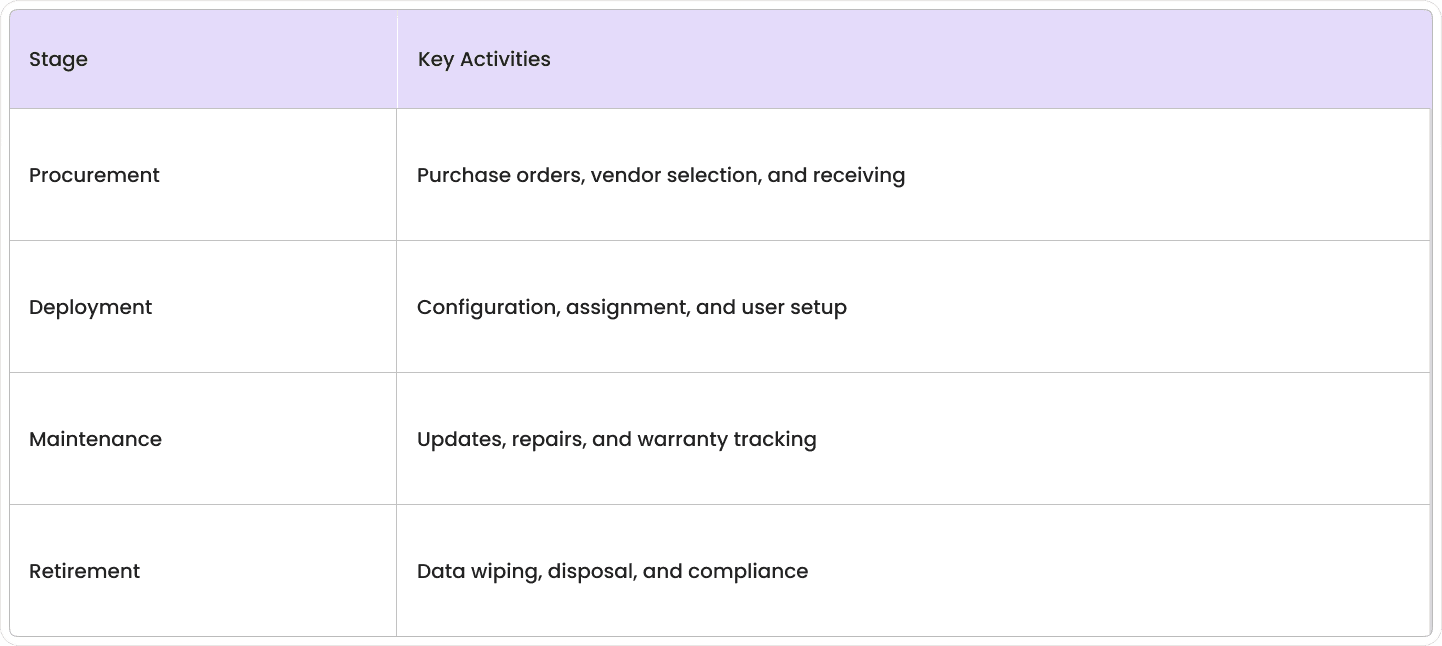
Procurement And Receiving
Purchase orders link directly to new asset records, and workflows can create asset entries as items arrive. This seamless connection ensures nothing gets lost from the moment you order it.
Deployment And Assignment
New assets go through deployment workflows that handle setup, security, and user assignment. You can apply asset tags or barcodes during this stage for quick identification later.
Maintenance And Warranty
The system tracks maintenance schedules and warranties, sending alerts for upcoming expirations. This history helps you identify problem devices and make informed repair-versus-replace decisions.
Retirement And Disposal
Retirement workflows ensure proper data wiping and disposal, creating audit records. This process is crucial for protecting sensitive data and meeting security and environmental standards.
Freshworks Inventory Management On Mobile With The Asset Inventory App
The Freshservice mobile app brings ITAM to your phone, which is essential for managing equipment across multiple locations.
Mobile capabilities include:
Access asset records from anywhere
Scan barcodes and QR codes
Update information in the field

Barcode And QR Code Scanning
The app uses your phone's camera to scan asset tags, instantly pulling up the asset's record. This speeds up audits, eliminates manual errors, and allows technicians to update status on the spot.
Update Assets Offline
You can update assets even without an internet connection. Changes sync automatically once you're back online, ensuring fieldwork is never interrupted. This is essential for techs in remote areas or during network outages.
Audit Trail From The Field
Every mobile update creates an audit trail showing who made the change and when. This tracking supports accountability, compliance and helps managers monitor asset movement.
Freshservice Software License Management And SaaS Control
Freshservice software license management tracks all purchased licenses, monitors real-time usage, and flags compliance gaps. This is crucial for controlling costs and mitigating audit risks.

Software asset management includes:
License inventory: Track all purchased licenses and entitlements.
Usage monitoring: Compare installations against license counts.
Compliance reporting: Find over- or under-licensed software.
Renewal management: Get automatic alerts for expiring licenses.
License Compliance Monitoring
The system checks software installations against your licenses to find compliance gaps. Over-licensing wastes money, while under-licensing creates legal and financial risks that can result in penalties of $100,000 or more. Regular scans help you right-size your budget and avoid costly vendor audits.
Renewal Alerts And Cost Optimization
Workflows track license expiration dates and send renewal reminders to your team. The system also helps you find and reallocate unused licenses to cut costs and discontinue software nobody uses, addressing the $18 million average waste companies face from unused SaaS licenses.
Shadow IT Detection And SaaS Management
The platform finds unauthorized software and cloud services, giving you a complete view of your software footprint. Once you identify this "shadow IT," you can evaluate security risks and manage hidden costs, which is a core part of SaaS management in Freshservice.
Dashboards, Reporting, And ROI Metrics
Freshservice includes built-in dashboards and reports to track asset data, compliance, financial metrics, and demonstrate ROI.

Real-Time Health Widgets
Dashboard widgets give you a real-time view of asset status, helping your team stay on top of tasks and spot potential problems before they grow.
Audit And Compliance Reports
Pre-built, schedulable reports support your internal audits and reduce the manual effort needed to prove due diligence.
Cost Savings Calculators
Built-in calculators help you track the financial impact of ITAM by tracking metrics like avoided software penalties and demonstrating ROI improvements up to 40% to justify your investment.
Integrations And Marketplace Connectors
Freshservice connects with your business systems through native integrations, marketplace apps, and APIs. Asset data flows automatically between tools.

Native ITSM Integrations
Asset records connect directly to other Freshservice modules:
Incident tickets show affected asset details and history.
Change requests identify impacted assets and dependencies.
Service catalog items can provision and track new assets.
Popular Third-Party Apps
You can integrate with many popular apps:
Active Directory: Sync user and device assignment info.
Microsoft 365/Google Workspace: Track software license usage.
Procurement systems: Import purchase orders and vendor data.
Monitoring tools: Update asset health and performance data.
API And Webhook Options
REST APIs and webhooks allow for custom integrations with legacy databases or homegrown apps, ensuring Freshservice fits your unique tech ecosystem.
Pricing Tiers And How To Pick The Right Plan
Freshservice pricing offers its asset inventory software features in several tiers, with higher plans unlocking more advanced capabilities.
Plan Feature Comparison

Hidden Costs To Watch
Look out for costs beyond the subscription, such as implementation, data migration, training, and change management. Premium support tiers may also cost extra.
Negotiation Tips
Multi-year deals and volume pricing for larger teams often come with discounts. Be sure to ask about special pricing for non-profits, educational institutions, or government agencies.
5 Steps To Implement Freshservice ITAM Faster
A structured approach helps you implement your IT inventory management system faster, minimize disruption, and maximize value. These steps follow best practices from successful projects.

1. Baseline IT Inventory Spreadsheet Cleanup
Most companies start with messy asset data. Before you import anything, clean up your spreadsheets by removing duplicates and standardizing formats. Focus on your most critical assets first.
2. Configure Auto-Discovery
Set up auto-discovery to find and catalog your assets. Start with agent-based discovery for servers and workstations, then add network scanning for other devices. Schedule scans to run regularly during off-hours.
3. Import And Map Data
Import your clean asset data into Freshservice, mapping your existing fields to Freshservice attributes. Test your imports with small batches first and verify that relationships are correct.
4. Automate Lifecycle Workflows
Create automated workflows for common ITAM tasks. Start with simple ones like device assignment for new hires and add more complexity as your team gets comfortable.
Common automation examples:
New hire workflows: Assign devices automatically during onboarding.
Maintenance alerts: Notify teams about upcoming warranty expirations.
Approval routing: Send purchase requests to the right managers.
5. Train Agents And Iterate
Train your IT staff on the new ITAM procedures, focusing on daily tasks. Collect feedback to adjust and improve your workflows, ensuring the system grows with your changing needs.
Go-live with fwdDeploy comes in
Everything above is what Freshservice can do. Getting it to actually do it, with clean data, working discovery, and a CMDB you can trust, is the part that eats months and quietly kills most rollouts.
That gap is what fwdDeploy exists to close. We're the AI deployment company and a certified Freshworks partner. We deploy AI agents for employee service and ITSM end-to-end: the service desk, the asset estate, the license tracking, and the integrations that feed it all.
Our model is AI-driven, FDE-led. The AI maps out the deployment at machine speed: it untangles your baseline spreadsheets, wires up agent and network discovery, maps the dependencies into a CMDB that reflects reality, and sets the license and warranty alerts that keep costs honest. A Forward Deployed Engineer owns the project from first scan to steady state and doesn't leave when the numbers are still moving.
When discovery misses half your printers, when the import breaks relationships, and when a renewal workflow ignores how your procurement team actually approves things, you have an engineer accountable for the fix.
Live in weeks.