10 Ways to Reduce Customer Support Ticket Volume
10 Proven Ways to Reduce Customer Support Ticket Volume Fast With AI
Written By
Riddhima Parkar
Posted On

10 Proven Ways to Reduce Customer Support Ticket Volume Fast With AI
Customer support teams often face a simple problem with expensive efforts: more tickets than agents can handle without delays. As ticket volume rises, queues grow, response times slow, and routine questions eat up time that could go toward complex cases.
AI changes how teams reduce customer support ticket volume by handling repetitive work before requests reach agents. AI chatbots, knowledge suggestions, automated workflows, and smart routing lower ticket counts without blocking help.
Ever feel like your support team is running a marathon on a treadmill, working harder, moving faster, never getting ahead?

The good news: you don't have to hire your way out of it. With the right AI-powered customer support setup, you can deflect a significant chunk of incoming tickets before they're even created.
AI agents now handle over 45% of queries in many organizations. Your agents focus on work requiring human judgment.
Why you need to reduce customer support ticket volume
Every ticket carries a cost in time, labor, and attention. A high number of avoidable tickets pulls agents into repeated work instead of complex troubleshooting, escalations, and higher-skill tasks.
Ticket deflection is the practice of preventing tickets from being created in the first place by resolving issues through self-service or automation. A customer finds an answer in a help center, resets a password through a bot, or tracks an order without ever contacting support.
Here is why support leaders prioritize it:
Lower support costs: Fewer agent hours spent on simple, repetitive requests, with conversational AI projected to save $80 billion in labor costs by 2026.
Reduced agent burnout: Constant queues and repeated questions contribute to stress and turnover rates of 38%.
Better customer satisfaction: 61% prefer self-service for simple issues over waiting for a live agent.
Scalability: A business can grow its customer base without adding headcount at the same pace.
How AI deflects tickets without hurting customer experience
AI deflects tickets by resolving routine questions the moment they arrive. It gives customers an instant path to a human when the issue is complex.
AI-powered customer support uses machine learning and natural language processing to understand customer questions. Unlike older automated systems that followed rigid scripts, modern AI interprets intent, recognizes context, and responds naturally.
A common concern is that AI will make support feel cold or robotic. That outcome usually comes from poor setup, weak knowledge content, or systems that hide the human support option.
The goal isn't to replace the human touch but to make it more powerful. By automating routine work, AI frees human agents to solve complex problems faster and with greater focus.
Intelligent deflection means a customer gets an accurate answer or automated resolution before a ticket is created, without feeling blocked from real help. When the issue is more complex, the same system collects details and passes the conversation to a human agent with context already attached.
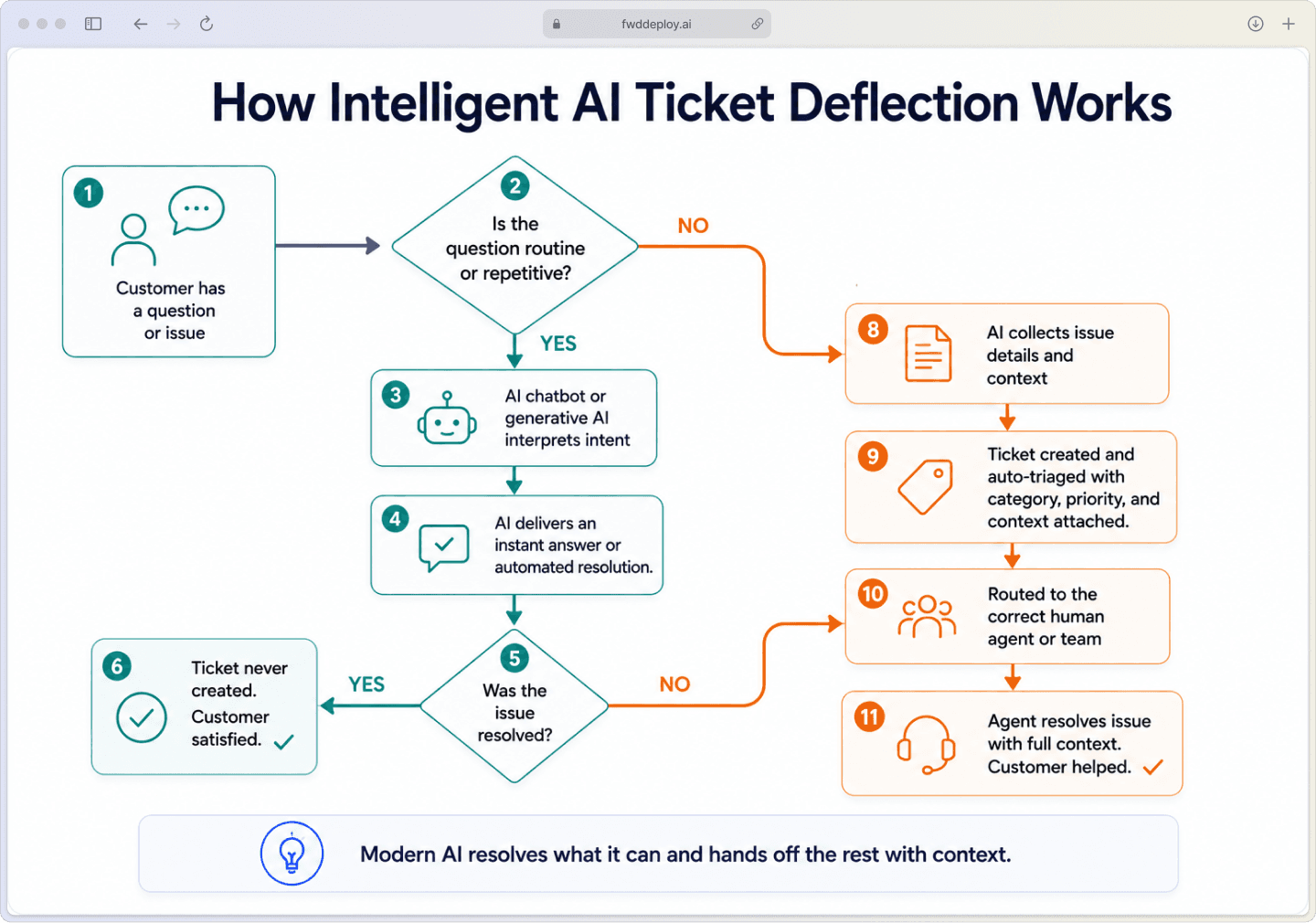
10 Proven Ways to Reduce Customer Support Ticket Volume With AI
The strategies below use AI to resolve common issues before they become tickets, freeing your agents to focus on complex problems where they add the most value. Here are ten proven methods to get started.
1. Use an AI chatbot as your frontline support
An AI chatbot intercepts requests before they become tickets. It answers common questions instantly and guides users to the right article. It collects details before routing to an agent, cutting unnecessary ticket creation.
Instant answers: Handles FAQs without creating a ticket.
Smart handoff: Transfers context to a human agent when escalation is needed.
Always available: Customers get help outside business hours.
2. Let generative AI handle repetitive questions at scale
Generative AI responses are answers written by AI in natural language rather than pulled from a fixed script. The system reads the question, understands the meaning, and creates a response that fits the customer's wording, even when the phrasing varies.
This is especially useful for the long tail of support questions that are similar but not identical. Billing questions, password issues, and order status requests arrive in many phrasings. Generative AI handles them without a separate script for each variation.
3. Automate email replies with an AI email bot
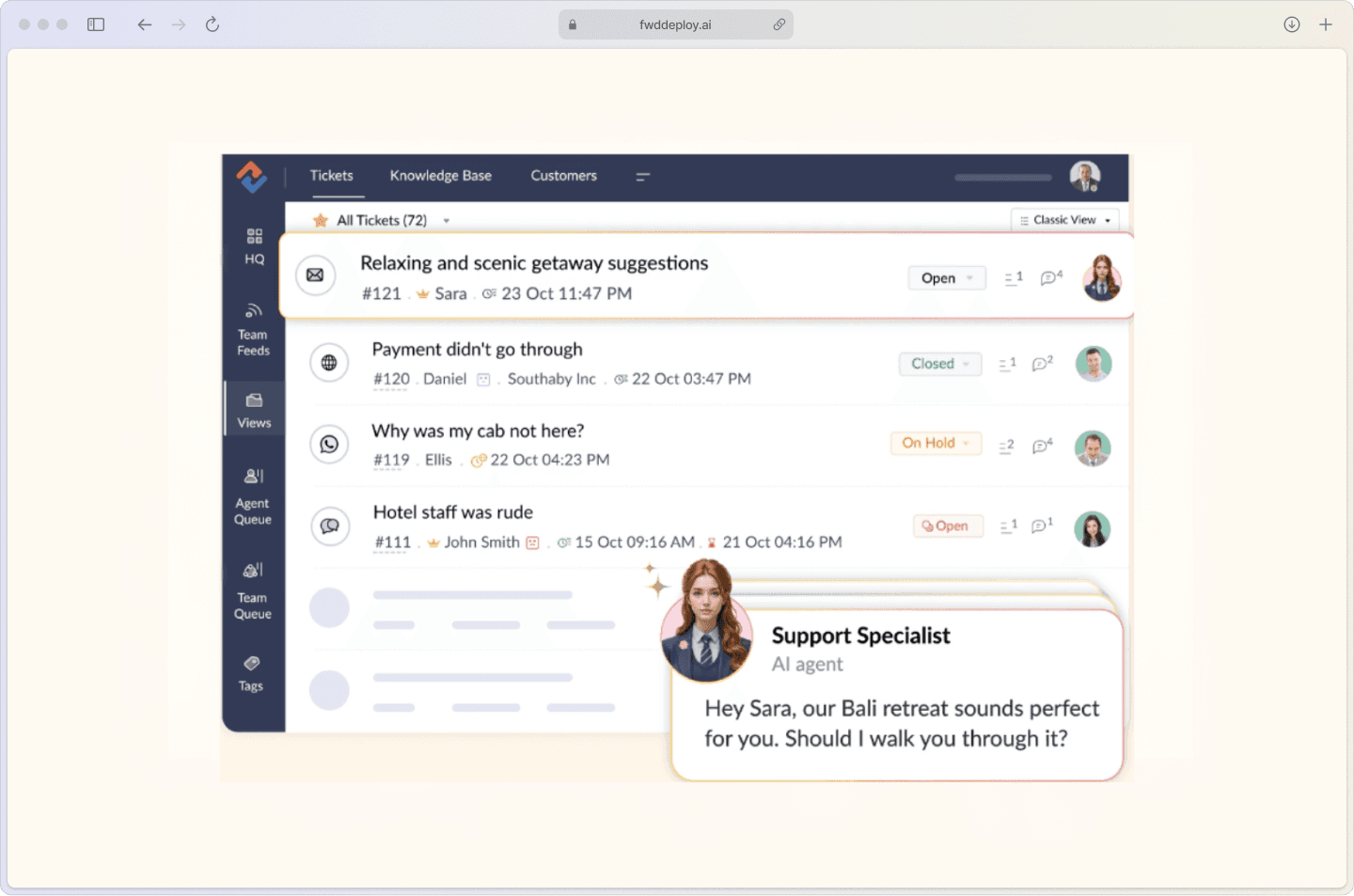
An AI email bot reads incoming messages and identifies the topic. It sends automatic replies for common issues or routes emails to the right queue with category and priority assigned.
Email automation works alongside chat, not instead of it. Many customers prefer email for account questions or longer explanations. Reducing ticket volume often means improving the email channel rather than replacing it.
4. Auto-triage and route tickets with AI workflows
Auto-triage means the system reviews incoming requests and classifies them automatically before a person touches them. It detects intent, assigns urgency, tags the category, and routes the ticket to the right team.
This reduces delays caused by manual sorting and reassignment. Platforms like Freshservice offer workflow automation for consistent categorization and routing.
5. Build a self-service knowledge base from recurring ticket themes
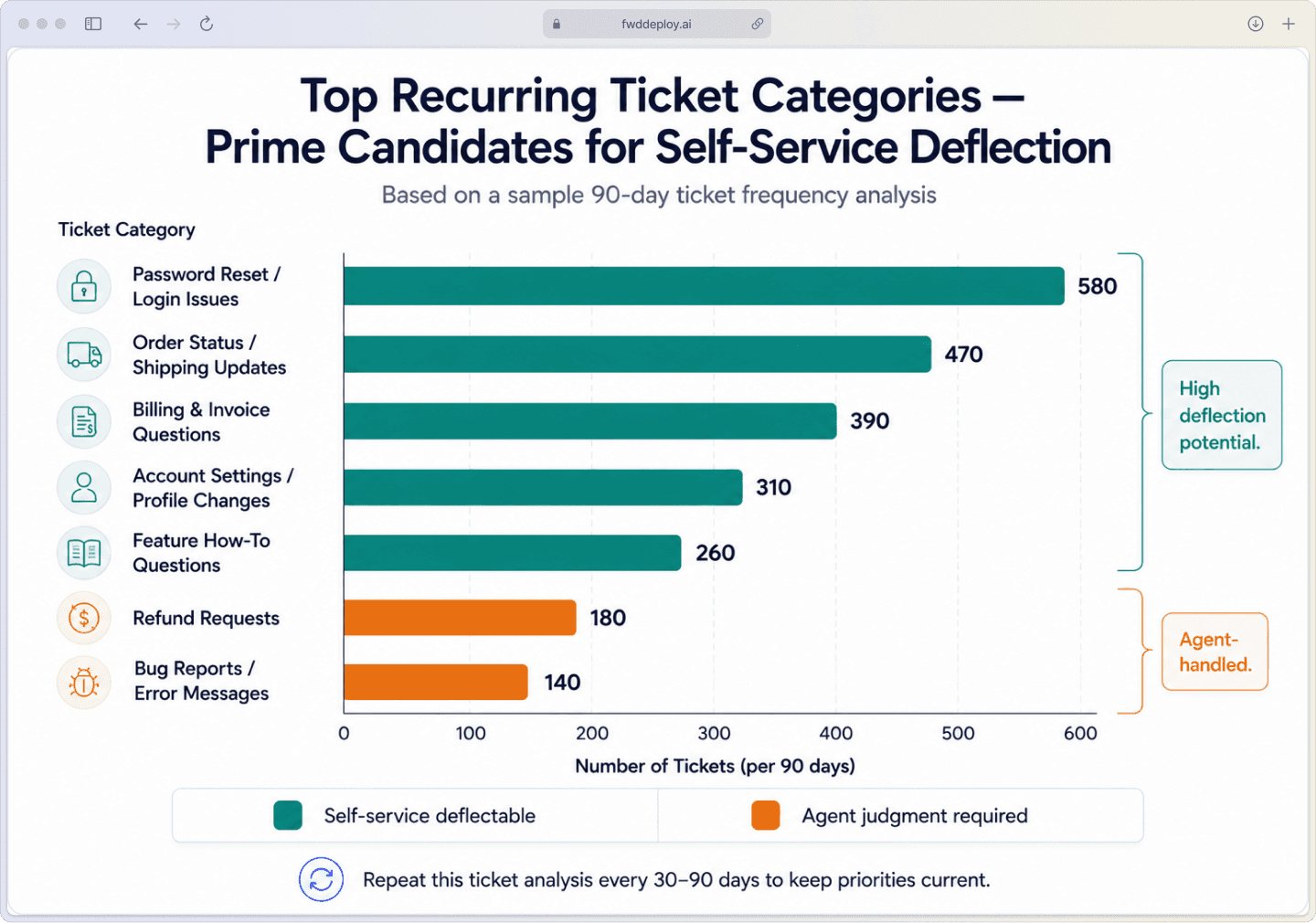
Recurring tickets often reveal missing answers, not just high demand. When the same questions appear repeatedly, those patterns can be turned into help articles, step-by-step guides, and troubleshooting pages.
A knowledge base is the foundation of ticket reduction because AI tools rely on clear source content. Missing, outdated, or hard-to-read information keeps deflection rates low.
Analyze ticket trends: Identify questions that appear repeatedly across categories.
Write in plain language: Avoid internal jargon so customers can find and understand answers.
Keep it current: Outdated articles often create more tickets than they prevent.
Track performance: Review search queries, article views, and thumbs-up data to spot gaps and refine content that underperforms.
6. Add AI-powered search to your help center
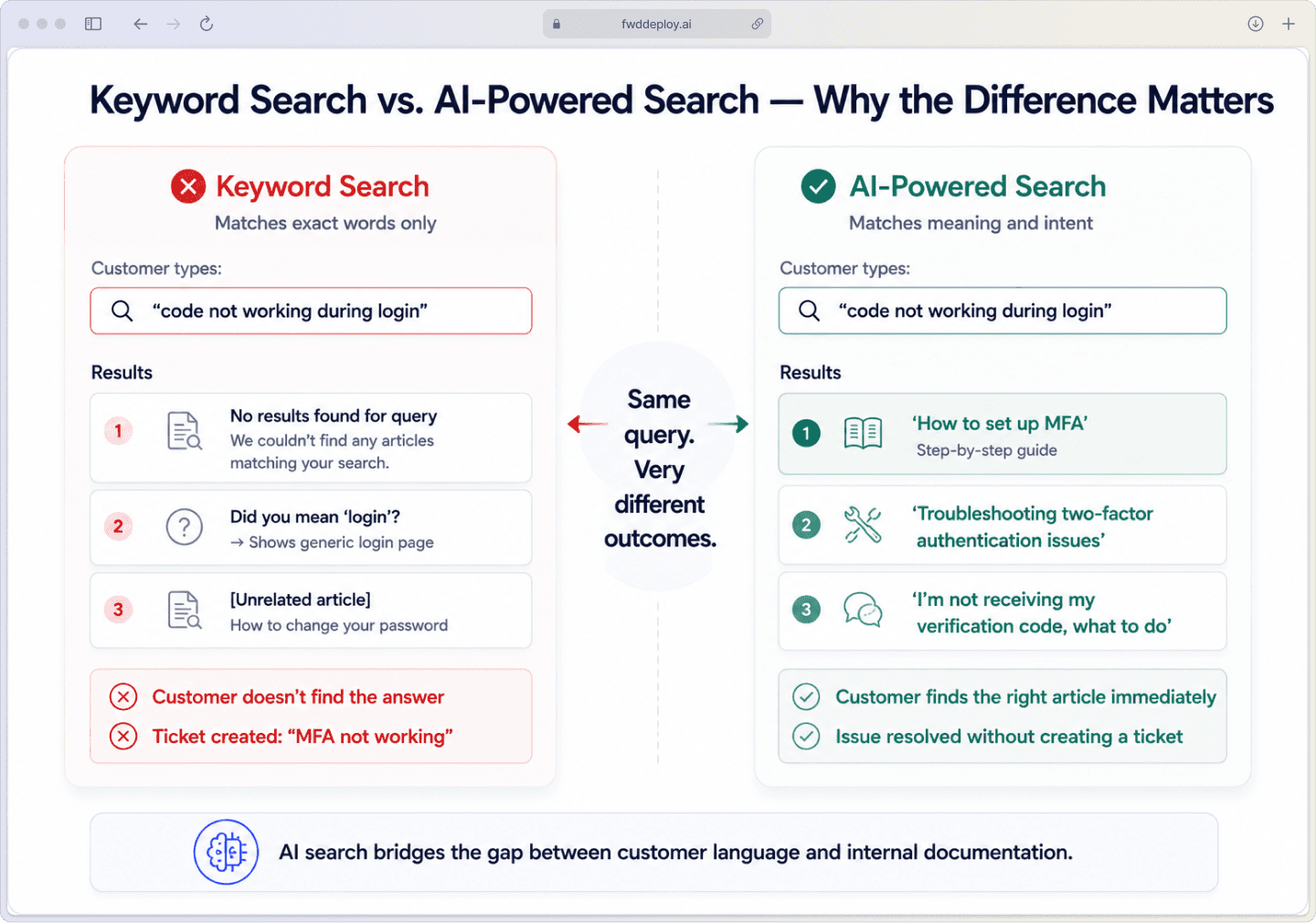
A basic keyword search looks for exact words. AI-powered search looks for meaning and intent, so it returns useful results even when the customer's wording does not match the article title.
This matters because customers rarely use the same language as internal teams. A help article might say "multi-factor authentication" while a customer searches for "code not working during login", and AI search connects the two.
7. Send proactive updates before customers ask
Proactive support means sending updates before customers reach out. This includes notices about outages, maintenance windows, billing events, shipping delays, or known bugs.
A simple status update stops waves of identical messages asking, "Is the system down?" It prevents spikes in ticket volume before they start.
8. Reduce confusion-based tickets with smarter onboarding
A significant share of support volume comes from confusion during early product use. Personalizing onboarding paths reduces confusion by showing only relevant steps. Product tours and in-app guidance explain features at the right moment.
Customer behavior data helps guide time more accurately. If a user pauses on a billing page or repeats a failed action, the system surfaces a tooltip in context. This prevents frustration from becoming a ticket.
9. Run root cause analysis on your top ticket drivers
Root cause analysis looks past the ticket itself and asks why the issue keeps happening. The answer may be a broken workflow, unclear product copy, missing guidance, or a recurring bug that generates repeated support demands.
Some ticket volume is not a support problem at all. Teams sometimes fix the product or simplify forms to prevent avoidable errors. This reduces volume rather than deferring the same issue.
10. Prepare AI answers before seasonal ticket spikes
Ticket spikes follow predictable events: launches, holidays, renewals, billing cycles, and promotions. Historical data shows when surges occur and what questions appear.
AI systems can be prepared with updated answers and expanded self-service content. This handles repeat questions during volume spikes without catching teams off guard.
How to measure ticket deflection and self-service success
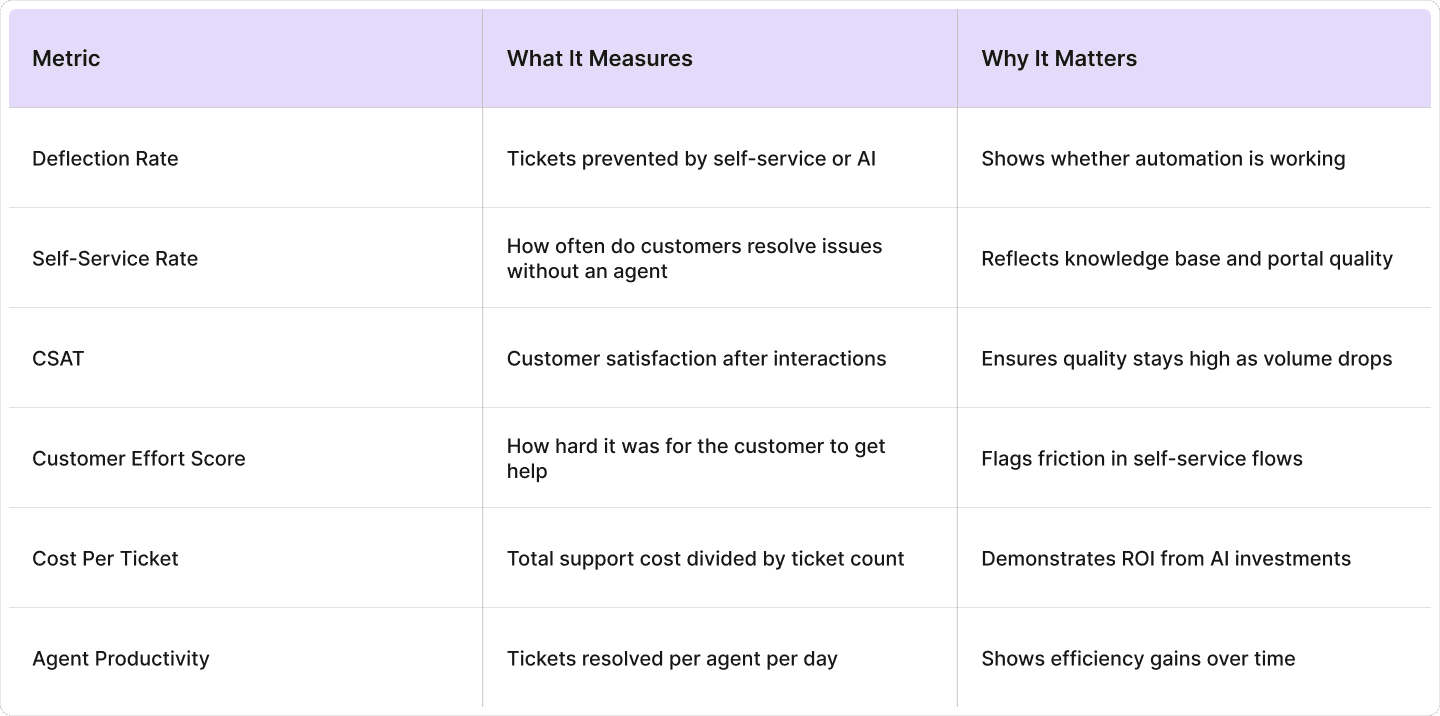
Measurement shows whether fewer tickets reflect real problem resolution or just a change in how requests are counted. A drop in ticket count means little if customers still cannot find answers or end up contacting support through a different channel.
Here are the key metrics worth tracking:
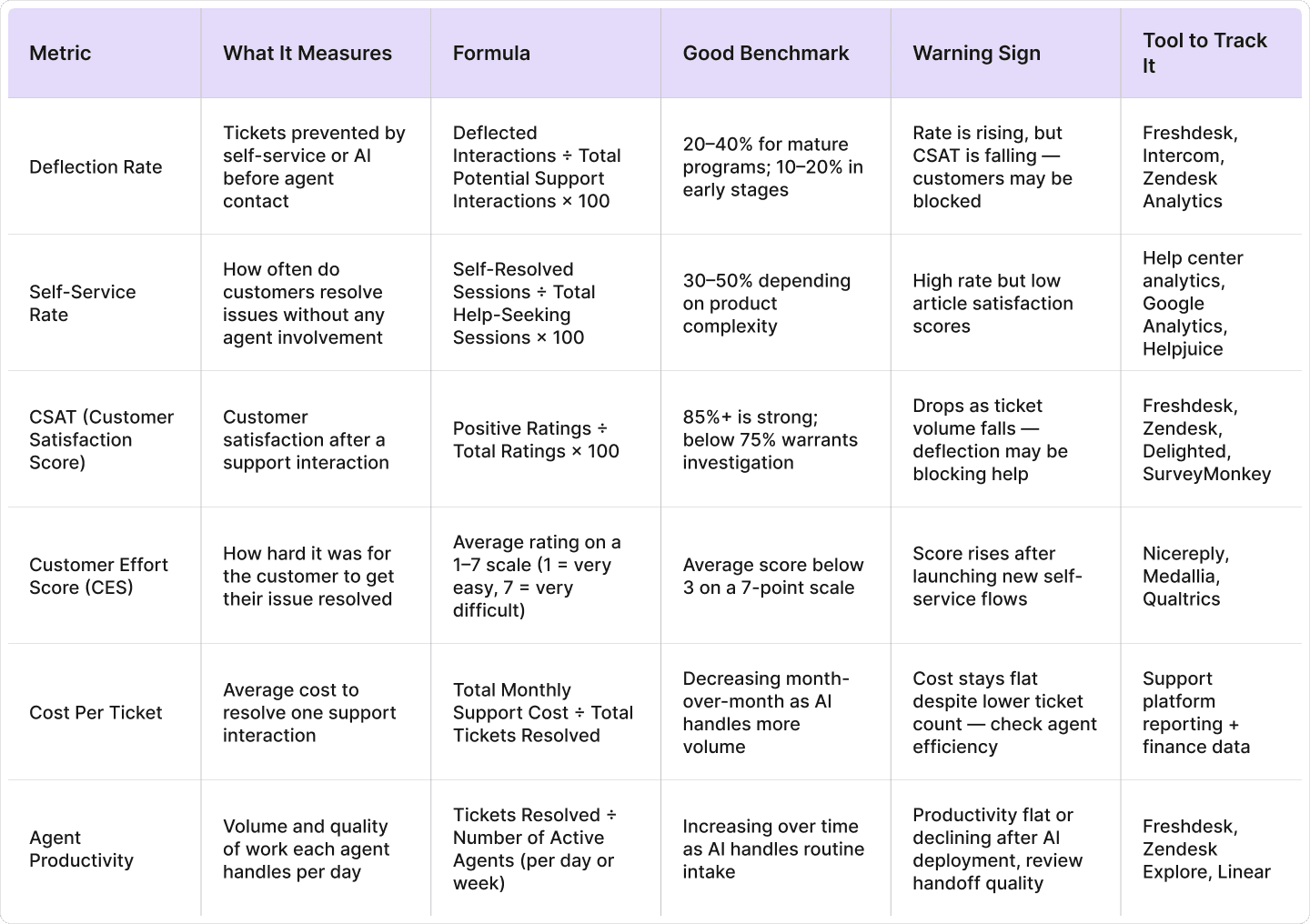
Deflection rate is calculated as: Deflected Interactions ÷ Total Potential Support Interactions × 100. For example, if 1,000 customers looked for help and 250 resolved the issue without an agent, the deflection rate is 25%.
Cost per ticket is calculated as: Total Support Cost ÷ Total Tickets Resolved. If support costs $50,000 per month and the team resolves 5,000 tickets, the cost per ticket is $10. AI deflection changes that number when the same budget supports a higher share of complex, higher-value work.
Ticket count and customer satisfaction do not always move together. If self-service blocks help access, CSAT can fall while volume declines. Track both metrics for accuracy.
Common mistakes to avoid when reducing ticket volume
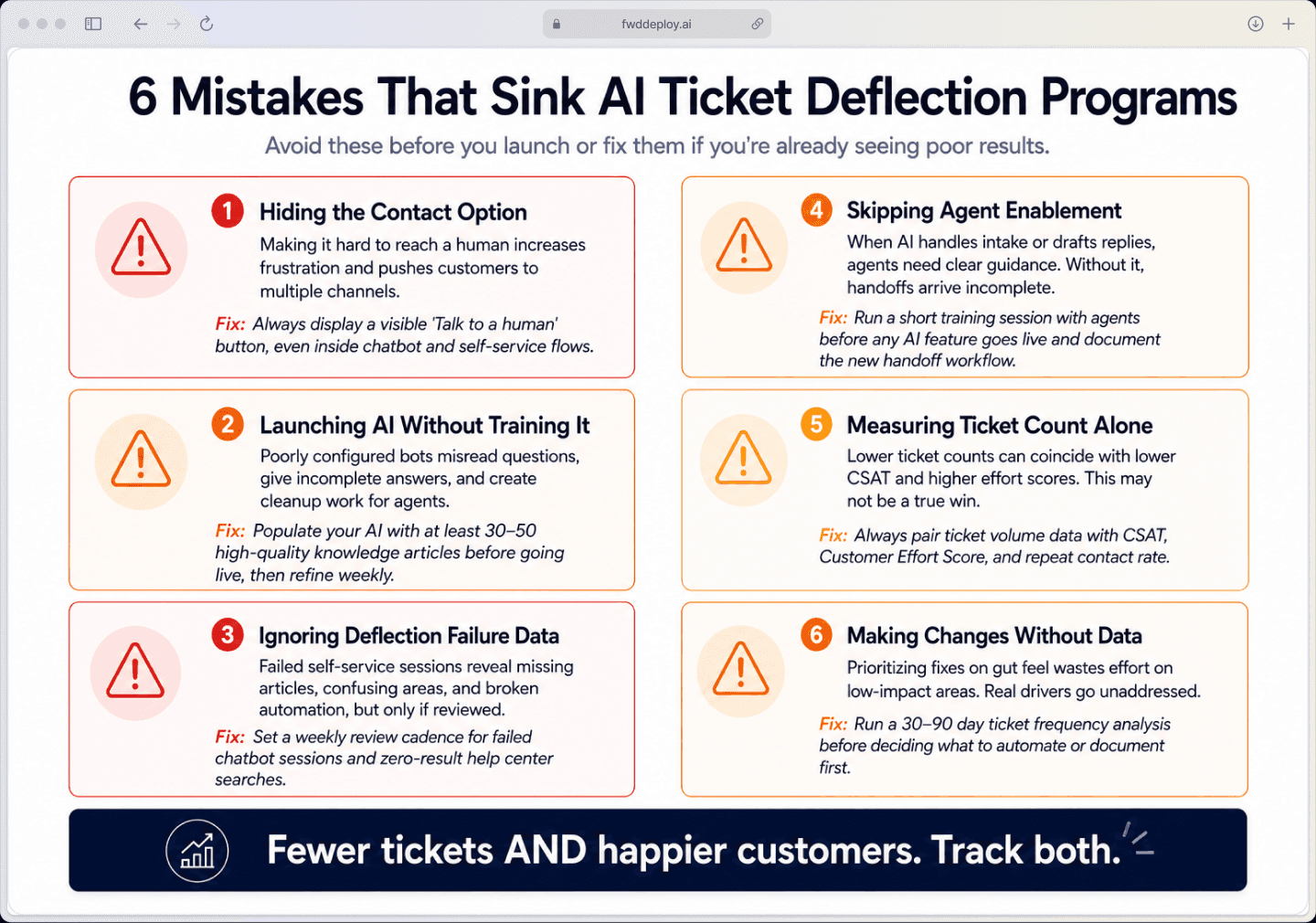
Efforts to reduce ticket volume often fail when teams prioritize lower counts over better design. Common mistakes appear repeatedly in AI and self-service projects:
Hiding the contact option: Making it hard to reach a human increases frustration and often leads to repeat contacts across multiple channels.
Launching AI without training it: Poorly configured bots misread questions, give incomplete answers, and create cleanup work for agents after failed self-service attempts.
Ignoring deflection data: Failed self-service interactions contain useful signals about missing articles, confusing product areas, and broken automation paths, worth reviewing regularly.
Skipping agent enablement: Agents work differently when AI handles intake or drafts replies; without clear guidance, handoffs can arrive incomplete or out of context.
Measuring ticket count alone: Lower volume can coincide with lower CSAT or higher effort scores, making it incomplete data.
Making changes without data: Prioritize fixes only after you confirm the root causes through ticket analysis and customer feedback.
Start Reducing Your Support Ticket Volume With fwdDeploy.ai
If you are working through which AI tools fit your support environment or trying to figure out how to connect automation with your existing helpdesk, that is exactly where fwdDeploy.ai comes in. We specialize in turning AI strategy into a fully operational system that delivers measurable results.
We help organizations deploy, configure, and optimize their AI support platforms. From initial workflow design and knowledge base structuring to chatbot training and system integration. The goal is always the same: fewer avoidable tickets, faster resolutions, and a support experience that works for both customers and agents.
Start your free CS Ops assessment, and we’ll analyze your current setup, identify your biggest ticket drivers, and show you where automation will make a measurable difference.

Ready to fix your sales-to-CS handoff?
Stop losing context between teams. fwdDeploy builds handoff processes that run inside your CRM and CS tools, not spreadsheets.
FAQs About AI personalization
How quickly can AI-powered ticket deflection reduce incoming support volume?
What deflection rate is realistic for an AI-powered customer support program?
Does AI customer support work for both IT service desks and external customer support teams?
What happens to support quality when ticket volume drops through AI deflection?
How do you identify which tickets are good candidates for AI deflection?
How can I reduce ticket volume without hiring more agents?
Five questions. Your work email. Under four minutes. We will tell you your maturity level, your highest-impact gap, and whether a conversation makes sense. No pitch. No demo request.
